

How Do I Redeem Anime Fighters Simulator Codes?
Time needed: 2 minutes
To redeem codes in Anime Fighters Simulator these steps are followed:
- Launch the Game: Open Roblox, search for Anime Fighters Simulator in the game library, and click to play.
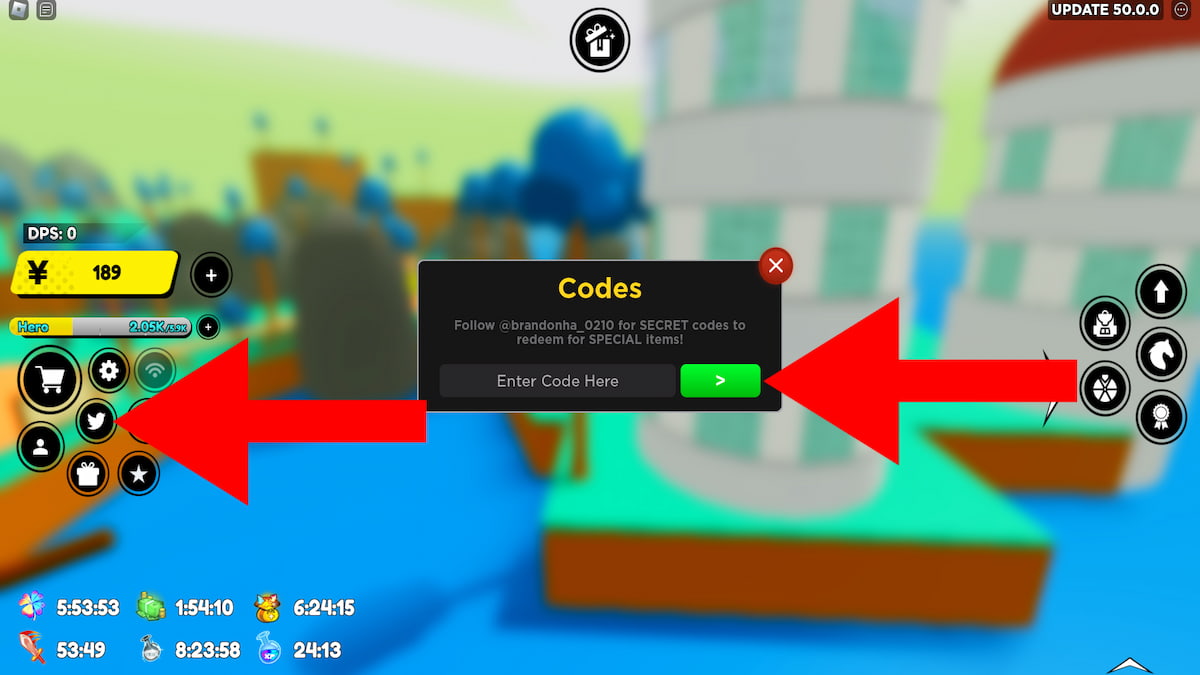
- Access the Code Menu: Once in-game, locate the Twitter bird icon on the left side of the screen (usually part of the main HUD). Click it to open the code redemption window.
- Enter the Code: In the pop-up window, find the text box labeled “Enter Code Here.” Type or paste a valid code exactly as provided (codes are case-sensitive).
- Redeem the Code: Click the green arrow button (often labeled “>” or “Redeem”) next to the text box to submit the code.
- Check Rewards: If successful, a notification will display your rewards (e.g., Yen, Boosts). Check your inventory or currency balance to confirm.
More About Anime Fighters Simulator
Anime Fighters Simulator is a simulator, RPG, fighting, and adventure game where players can collect and train fighters based on popular anime characters. You explore various worlds, fight bosses, and unlock new abilities for your team. The game’s focus on progression means you are always working to get stronger fighters and discover new areas.

Click here to go to our Roblox Codes index
The game’s developers constantly add new content, including new worlds, fighters, and events to keep the gameplay fresh and engaging. Players trade with each other to get rare units, participate in limited-time events, and challenge friends to show off their powerful fighters. This creates a vibrant and competitive community.

