

Unlock cheats for Cyberpunk 2077. Find the complete list of console commands for God Mode, infinite money (Eurodollars), item spawning, max level, and more. (PC Only)
See our large index of over 3,000 games and 70,000 codes!
✨Cyberpunk 2077 Console Codes (January 2026)
In Cyberpunk 2077, there is no native cheat console like in Skyrim or Fallout. To use “console codes,” you must first install the Cyber Engine Tweaks (CET) mod on PC.
As of January 2026, following the major 2.0+ updates (including the latest 2.3x patches), the command syntax has stabilized. Here are the most useful active codes and how to use them.
1. Essential Setup (PC Only)
- Download: Get the latest version of Cyber Engine Tweaks from GitHub or Nexus Mods.
- Install: Drop the files into your game folder:
Cyberpunk 2077/bin/x64/. - Open: Launch the game and press the Tilde (~) or F4 key (you’ll be prompted to set a shortcut on the first launch).
2. General Gameplay Codes
These codes allow you to bypass the grind for money, levels, and carrying limits.
| Result | Command (Copy & Paste) |
| Add Money (Eddies) | Game.AddToInventory("Items.money", 100000) |
| Set Player Level | Game.SetLevel("Level", 60) |
| Set Street Cred | Game.SetLevel("StreetCred", 50) |
| Infinite Stamina | Game.InfiniteStamina(true) |
| Add Carry Capacity | Game.ModStatPlayer("CarryCapacity", "500") |
| Add Perk Points | Game.AddToInventory("Items.PerkPointSkillbook", 10) |
| Unlock All Vehicles | Game.GetVehicleSystem():EnableAllPlayerVehicles() |
3. Iconic Weapons & Cyberware
To spawn specific legendary items, use these strings. Replace the “1” at the end with the quantity you want.
- Johnny Silverhand’s Malorian:
Game.AddToInventory("Items.Preset_Silverhand_3516", 1) - Satori (Katana):
Game.AddToInventory("Items.Preset_Katana_Saburo", 1) - Skippy (Talking Gun):
Game.AddToInventory("Items.mq007_skippy", 1) - Cyberware Capacity Shard:
Game.AddToInventory("Items.CWCapacityPermaReward_Legendary", 1) - Iguana Egg:
Game.AddToInventory("Items.q005_iguana_egg", 1)
4. Crafting & Quickhack Components
With the 2.0 crafting overhaul, these components are vital for upgrading Tier 5++ gear.
- Legendary Components:
Game.AddToInventory("Items.LegendaryMaterial1", 1000) - Epic Components:
Game.AddToInventory("Items.EpicMaterial1", 1000) - Legendary Quickhack Parts:
Game.AddToInventory("Items.QuickHackLegendaryMaterial1", 1000)
5. Skill Progression (2.0+ Skills)
To instantly max out your specific skill trees (Shinobi, Solo, etc.), use this format: Game.SetLevel(“Shinobi”, 60) (Works for: Shinobi, Solo, Engineer, Headhunter, Netrunner)
Tips for 2026
- Console Players: Unfortunately, there is still no way to use these codes on PS5 or Xbox Series X/S. You can only “cheat” via cross-progression by transferring a modded save from a PC to your console.port coordinates, check the categorized command lists on Nexus Mods or the REDmodding Discord.
- Safety: Always make a backup save before using CET commands. Extensive stat modding can occasionally “break” progression flags in certain missions.
- Phantom Liberty: If you have the expansion, expansion-specific items usually follow the
Items.Preset_...naming convention as well.

How Do I Redeem Cyberpunk 2077 Console Codes?
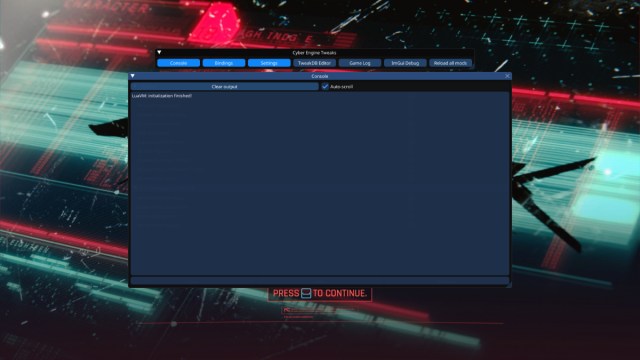
Time needed: 4 minutes
Install Cyber Engine Tweaks (CET, v1.37.1+ for latest patches):
- Download from Nexus Mods or GitHub.
- Extract to game folder (e.g., Steam: steamapps\common\Cyberpunk 2077; GOG: GOG Games\Cyberpunk 2077).
- Launch game (borderless window recommended), bind key (default ~ tilde) on first load.
- Press ~ in-game to open CET overlay > Console tab. Paste commands & Enter. Copy-paste multi-line scripts easily.
- Warnings:
* Achievements disabled for session (relaunch to re-enable). Back up saves – can corrupt quests/inventory.
gamewatcher.com
* CET fixes AMD performance/security issues; REDmod compatible but disable conflicting mods (e.g., Equipment-EX).
nexusmods.com
* 2.0+ changed syntax (e.g., no more direct player.setav); use updated lists.
wiki.redmodding.org +1
* Full IDs/spreadsheets: CET 2.x Commands, Nexus Categorized List, Item DB, wiki.cyberpunk.net (Technical section).
More About Cyberpunk 2077
Cyberpunk 2077 plunges players into Night City, an immense, hyper-detailed Open-World setting. This sprawling Action-Adventure RPG forces you, as the mercenary V, to make difficult choices that directly shape the narrative’s outcome. Consequently, you must master the deep Shooter combat and install powerful cyberware from ripperdocs to survive. Ultimately, this dystopian Science Fiction experience lets you define your legend among the city’s corporate and street factions. (75 words)
Code Index | Home | Guides | Franchise Games | Roblox Games
