How Do I Redeem Ghost Simulator Codes?
Time needed: 2 minutes
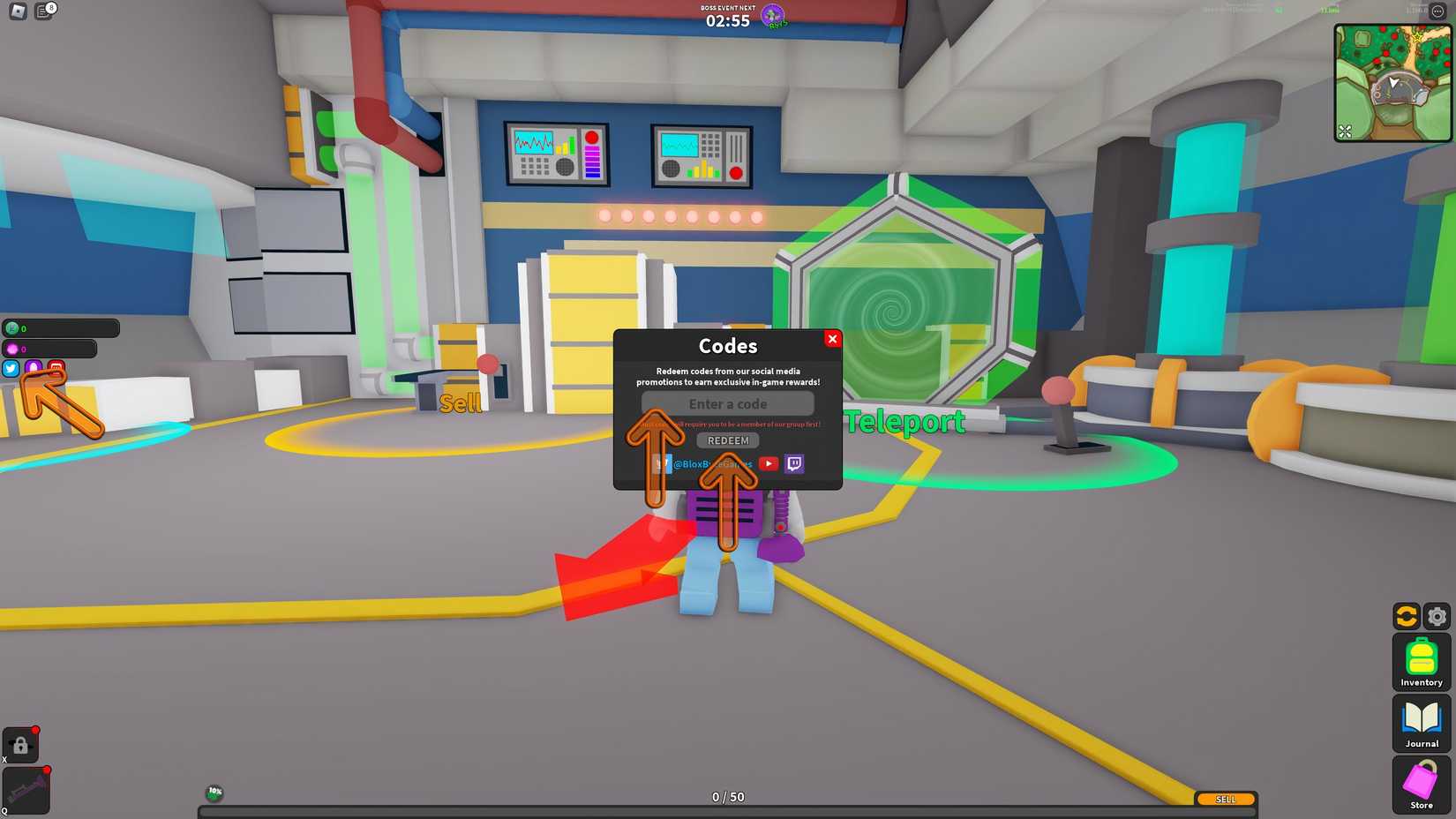
To redeem codes in Ghost Simulator these steps are followed:
- Load into Ghost Simulator on Roblox.
- On the left sidebar, click the Twitter bird icon (codes menu).
- In the pop-up window, enter a code in the text field.
- Click Redeem to get your items (they appear in your inventory).
- Troubleshooting: Group membership is required for many codes—join via the link in the game description. Codes are case-sensitive; expired ones (e.g., event-specific) won’t work. Follow BloxByte on X/Twitter.
More About Ghost Simulator
Ghost Simulator haunts simulator, exploration, pet-collecting, and questing genres, equipping vacuums to capture spectral foes. Hunters upgrade antennas for biomes, sucking ectoplasm into tokens. However, bosses demand team takedowns, yielding gems. As a result, lore unfolds through eerie errands.
Click here to go to our Roblox Codes index
Besides, rebirths grant perks, like 25% gem boosts for premiums. Hoverboards zip across maps, chasing rares. Communities share ghost spots on Discords, optimizing hauls. Thus, this phantom pursuit enchants with spooky sprees and supernatural swells.