How Do I Redeem Pet Tycoon Codes?
Time needed: 2 minutes
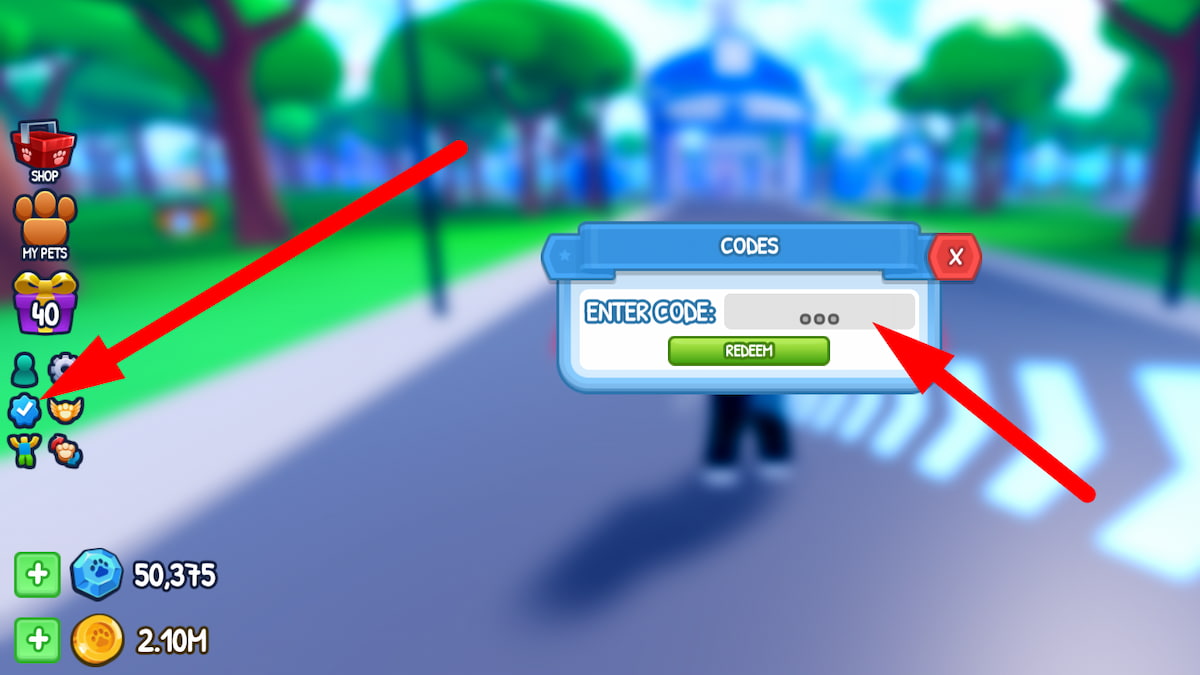
To redeem codes in Pet Tycoon these steps are followed:
- Launch Game: Open Roblox, search “Pet Tycoon”, and join a server.
- Find Redeem Button: Click the blue checkmark or thumbs-up icon on the left.
- Enter Code: Type or paste a valid code into the textbox.
- Claim Reward: Press Redeem for boosts or pets.
More About Pet Tycoon
Pet Tycoon blends tycoon, simulator, adventure, and roleplay genres, captivating players with pet-filled business building. You assign pets to interactive items for diamond gains, hire workers for coin boosts, and hatch eggs for rare companions. Vibrant worlds encourage solo grinding or friend collaborations. Moreover, upgrades transform basic setups into thriving empires. Furthermore, community events unlock exclusive rewards, fostering competition. Players trade pets or compete on leaderboards, ensuring dynamic sessions. Developers release frequent codes, accelerating progress. Thus, Pet Tycoon empowers aspiring tycoons to craft adorable, profitable paradises.
Click here to go to our Roblox Codes index
Meanwhile, roleplay elements add narrative depth, letting you storytell pet antics. You explore themed areas, customizing shops uniquely. Updates introduce new eggs, keeping collections fresh. Consequently, the game delivers endless charm, drawing pet lovers into strategic, heartwarming growth.