How Do I Redeem Skydive Race Clicker Codes?
Time needed: 2 minutes
To redeem codes in Skydive Race Clicker these steps are followed:
- Launch the Game: Open Roblox on your platform and search for Skydive Race Clicker. Click the green Play button to enter a server.
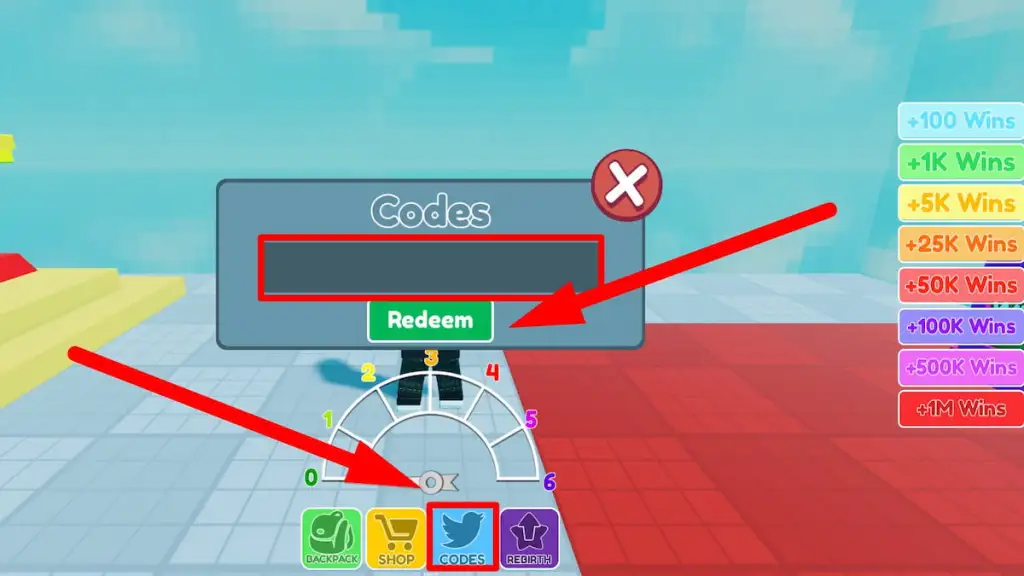
- Locate the Codes Button: Check the left or right side of the screen for a Twitter icon labeled “Codes,” often positioned near options like Pets or Leaderboards.
- Enter the Code: Click the Twitter icon to reveal a text box labeled “Enter Code Here.” Input the code precisely, matching uppercase and lowercase letters, as codes are case-sensitive.
- Redeem the Reward: Press the “Redeem” button. If the code is valid, a notification will confirm your reward (e.g., wins, pets, or boosts), applied immediately to your account.
More About Skydive Race Clicker
Skydive Race Clicker shines in clicker, racing, simulator, and adventure genres within Roblox. Players tap furiously to plummet through skies, collecting weights for speed boosts toward finish lines. Progressive levels unlock colorful worlds, with wins fueling permanent upgrades. Moreover, overhaul updates pack in features for deeper progression.
Click here to go to our Roblox Codes index
Leaderboards ignite rivalries, as players chase elite times. Pet companions and rebirths add layers to clicking marathons. Community events introduce themed races, sustaining momentum. Thus, Skydive Race Clicker thrills idle gamers with gravity-defying rushes, offering satisfying loops of clicks, falls, and victories in an ever-expanding aerial playground.