
Current official promo (Oct 2026)Aurora Cape (Java + Bedrock)
- Watch a Minecraft Dungeons II stream:
- Twitch Partner/Affiliate: 15 minutes
- TikTok Game Rewards stream: 3 minutes
- Watch window: Sep 29 – Oct 14, 2026
- Claim the personal 5×5 code from Twitch Drops / TikTok rewards
- Redeem it at minecraft.net/redeem by Oct 31, 2026
Some people are hitting “redemption code unavailable.” Try again later, or use TikTok if Twitch is stuck.Other official capes:
- Hero Cape — play Dungeons I, then log into Dungeons II on the same Microsoft account (through Dec 31, 2026)
- Twisted Cape — Dungeons II pre-order bonus (pre-order window already closed)
How to get a real code
- Retail gift card / boxed copy / digital receipt
- Minecoin pack from Microsoft, Amazon, or a store
- Official merch (Mattel, Razer, PDP controller, Kellogg’s, events)
- Microsoft Rewards Minecoin packs
Those codes are printed on the card, insert, or email. They are not posted publicly.If a code fails
- Wrong account (it locks to the first Microsoft account used)
- Wrong store (Java vs Xbox vs PlayStation vs Switch)
- Already redeemed
- Region mismatch
- Child account needs parent approval
Here’s the useful version of each.1. Redeem / gift / Minecoin codesThese are one-time codes from gift cards, boxed copies, Minecoin packs, or official promotions.Official redeem pages
- Minecraft: minecraft.net/redeem
- Microsoft / Xbox / Windows: redeem.microsoft.com
How they work
- Java Edition codes → minecraft.net/redeem with the Microsoft account you play on
- Windows / Xbox Bedrock game codes → Microsoft Store / redeem.microsoft.com
- PlayStation / Switch codes → that console’s store only
- Minecoins → Bedrock Marketplace only; they do not work on Java
Important: Public “free Minecraft codes” lists are almost always fake, expired, or already used. Real codes come from purchases, official merch, Microsoft Rewards, or time-limited brand promos (cereal, events, etc.).
2. Command / cheat codes
These are slash commands typed in chat. Cheats must be on (Java: Allow Commands; Bedrock: Allow Cheats). On Bedrock, turning cheats on permanently disables achievements for that world.
Open chat (T on PC) and type:
| Goal | Command |
|---|---|
| Creative mode | /gamemode creative |
| Survival | /gamemode survival |
| Spectator | /gamemode spectator |
| Give items | /give @s diamond 64 |
| Teleport | /tp @s 100 70 -200 |
| Daytime | /time set day |
| Clear weather | /weather clear |
| Keep items on death | /gamerule keepInventory true (Java) or /gamerule keepinventory true (Bedrock) |
| Find a village | /locate structure village |
| World seed | /seed |
| Night vision | /effect give @s night_vision 999999 0 true |
Selectors: @s you, @p nearest player, @a everyone, @r random player, @e all entities.
3. Shop coupon codes
These are for merch on the official Minecraft Shop (minecraftshop.com / shop.minecraft.net), not free game copies. Coupon-aggregator sites list codes like LABORDAY, WELCOME10, or newsletter 15% off, but they expire quickly and often don’t apply to gift cards or sale items. Check the shop checkout itself.
4. World seeds
A seed is the number that generates a world. After creating a world, type /seed to see it. People share seeds for villages, monuments, cherry groves, etame rewards.
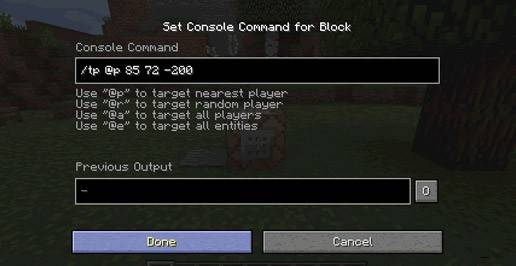
How to Enter Console Commands in Minecraft (Basic Guide)
Time needed: 4 minutes
How to redeem codes in Minecraft:
- Find Your Code: Locate the 25-character code.
- Go to the Redemption Page; https://www.minecraft.net/en-us/redeem/
- Sign In: You must sign in with the Microsoft Account.
- Enter the Code.
- Confirm and Enjoy!
How to Enter Console Commands in Minecraft (Extended Guide)
Entering console commands in Minecraft is straightforward, but it first requires you to have cheats enabled in your world.
🔑 Step 1: Enable Cheats
Before you can use commands, you must enable “cheats” for your world:
- For a New World (Java & Bedrock): On the Create New World screen, make sure the Allow Cheats or Activate Cheats option is toggled On.
- For an Existing World (Java Edition): Open the pause menu (Esc), select Open to LAN, then toggle Allow Cheats to On, and click Start LAN World. Note: This only lasts for the current play session.
- For an Existing World (Bedrock Edition): You can change this in the world settings menu, but enabling cheats will permanently disable achievements for that world.
💬 Step 2: Open the Command/Chat Interface
Press the key or button that opens the chat window for your platform:
- PC (Java & Bedrock): Press the forward slash key (
/) or theTkey. Using/is generally faster because it automatically prefixes your command. - Console (Xbox, PlayStation, Switch): Press the Right Directional Pad (D-pad) button.
✍️ Step 3: Enter and Execute the Command
- Type the Command: All commands must start with a forward slash (
/). - Use Tab (PC only): As you type, the game will suggest commands and arguments; press Tab to autocomplete the highlighted text.
- Execute: Press Enter on PC/Keyboard or the equivalent button on your console (often a button like ‘A’ or ‘X’ after typing).
Top 5 Gameplay Strategies for Minecraft
The best strategies in Minecraft:
- Prioritize Stone Tools and Shelter: Your first few minutes should be spent gathering wood, then immediately using it to craft a crafting table and a wooden pickaxe. Quickly mine enough stone to upgrade your essential tools—pickaxe, axe, and sword—and dig a small hole in a hillside to survive the first night.
- Acquire a Bed Immediately: Finding and killing three sheep (of the same color) for wool should be a top priority during the first day. Crafting and sleeping in a bed allows you to skip the dangerous night and sets a crucial new spawn point.
- Light Up and Mob-Proof: Hostile mobs only spawn in dark areas with a light level of 7 or less, both above and underground. Craft and place torches liberally inside your home, mine, and surrounding perimeter to prevent monsters from spawning and keep you safe.
- Establish a Renewable Food Source: Constantly hunting for food is time-consuming and inefficient, so focus on setting up a farm early on. Plant seeds, potatoes, or carrots, or create a small fenced-in pen to breed cows and pigs for a steady supply of cooked meat.
- Branch Mine for Strategic Resources: Once you have iron armor and tools, establish a long, straight mining tunnel deep underground, typically at diamond-level (Y-level -58 or below). Digging long parallel “branches” off the main tunnel is the most efficient way to find diamonds and other valuable ores.
More About Minecraft
Minecraft revolutionized open-world gaming, blending elements of a sandbox, survival game, action-adventure, RPG (Role-Playing Game), and simulation into a single blocky experience. Players explore vast, procedurally generated landscapes, gather materials, and then craft essential tools and formidable structures. Hostile mobs, especially when night falls, force players to prioritize immediate survival, giving a sense of urgency to the exploration and building loop.
Ultimately, the game’s famous Creative Mode and deep modding community encourage limitless architectural projects and custom game experiences. Consequently, this enduring blend of freedom, challenge, and creativity drives its incredible popularity, motivating millions to continuously explore new updates and share their ambitious worlds online.
